Case 01 · Smart TV and phone web
Phynd Games
A cloud game-streaming app for smart TVs, controlled with a TV remote or a gamepad, with a touch version for phone browsers.
Overview
Phynd is a cloud game-streaming platform for smart TVs, with no console and no download. I co-designed the TV app with Phynd's graphic designer and built it: the launch animation, browsing, search, rankings, leaderboards, the profile picker, and the activity detection that times in-game ads. On the phone web app I built the touch layouts for the home and game-details screens and the loading countdown.
Constraints
- Input. A D-pad on a TV remote or a gamepad is the only input. Part of the catalogue is playable with the remote alone, listed under "Play with your TV remote."
- Hardware. Smart TVs run low-power SoCs with little GPU power and memory, and the menu has to leave headroom for the video stream. Holding 60fps on that hardware set the rules under Rendering performance.
10-foot UI
The UI is read from about 3 m. Critical content stays inside an overscan-safe area, and the type scale uses heavy titles, short metadata and almost no body text.
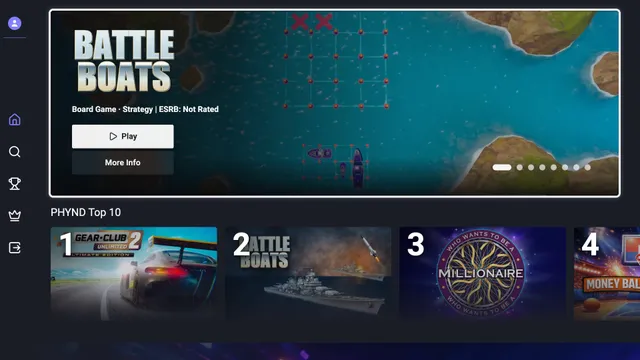
The home screen opens with a full-bleed hero carousel: title logo over key art, one genre and rating line, and Play and More Info. Rails follow: PHYND Top 10 with large rank numerals, Play with your TV remote, New on Phynd and Featured Games. The dark navy background keeps artwork saturated in a dim room and leaves the purple focus ring as the most saturated element on screen.
Rendering performance
A focus change that triggers layout runs smoothly on a laptop and drops frames on a TV. To hold 60fps on the slowest supported TV:
- Compositor-only animation. Focus, rail scrolling and the sidebar animate only
transformandopacity, so no frame needs layout or paint. - One transform per rail. A rail scrolls as a single transformed element, and DOM reads and writes are batched to avoid forced synchronous layout.
- Scoped re-renders. A focus change re-renders two cards: the one losing focus and the one gaining it.
- Virtualised rails. The first render creates only the cards on screen, and images load as rails approach the viewport.
The home screen's first render completes in under 200 ms.
Motion
Animations confirm a key press, show where focus moved, or play the launch logo. The hero carousel advances on a timer long enough to read each title. Cards have no parallax and no bounce, which keeps the number of simultaneous animations, and the GPU cost, low.
Activity detection
A game session can show a banner ad, and it should only appear when the player isn't playing. The TV app classifies each moment of a session as gameplay, paused, cutscene or idle, on the TV itself, from the stream's video and audio and the player's input. I designed and built the detector and the rules that time the banner.
- Input. Key, remote and gamepad input reset a quiet timer. Analysis starts only after 5 seconds without input, so nothing runs during active play.
- Video. Twice a second, the current stream frame is drawn into a 32×18 canvas and converted to luma. Each pixel is compared with the previous sample, and differences below the codec-noise floor are ignored. The score combines the share of changed pixels with how much of that change forms one connected region. A camera move in a cutscene changes one large region; menu animations and particles change scattered pixels.
- Audio. A Web Audio analyser reads the stream's sound without affecting playback and flags dialogue: sustained energy in the speech band.
- Decision. Every 5-second window compares its motion with the session's own baseline. A cutscene needs at least 7 of 10 samples to agree. Otherwise the window becomes paused (pause pressed), gameplay (input in the last 2 seconds) or idle.
The states have a priority (cutscene, paused, gameplay, idle) and a 1-second hysteresis, so the state doesn't flicker between samples. The banner is hidden during gameplay and shown in the other three states; once shown it stays for at least 15 seconds, and it waits 2 minutes before showing again. A long cutscene also resets the idle timer that ends inactive sessions. If a TV blocks reading the video frame or the audio, that signal drops out and the others keep working.
Phones
Phynd also runs in a phone's browser at play.phynd.games, with a search bar fixed at the top and a dock fixed at the bottom. Both take height away from the page, so the home and game-details screens needed their own layouts for touch phones.
- Upright. On short phones the featured slide was shorter than its own content, and the game logo slid under the search bar. The slide's minimum height is now the sum of its parts: logo, synopsis and buttons.
- Sideways. A phone held sideways leaves about 230–260 px between the search bar and the dock. When the screen is wider than it is tall and under 500 px high, home and game details switch to compact layouts that keep Play now above the dock. The check reads the layout viewport, so opening the on-screen keyboard on an upright phone doesn't trigger it.
- Descriptions. Game descriptions are clamped to three lines. View more appears only when the text overflows, with a 44 px touch target.
- Loading. While a game starts, one countdown covers the pre-roll ads and the server warm-up, which is estimated from the server tier. Past the estimate it shows 0:00 and "still preparing" instead of restarting.
- Branding and ads. The Phynd Beta wordmark sits on the dock, the landing page and sign-in, aligned to the 16 px content edge. On touch screens the ad's mute button is 48 px tall and pulses three times once muted, with no pulse under reduced motion.
Outcome
The beta launched in May 2026 for Samsung TVs in the US. Phynd is now live on Samsung, LG, Fire TV and Vizio TVs.
- The home screen's first render completes in under 200 ms.
- A player gets from the home screen to a loading game stream in under 5 seconds.
I owned both the design and the implementation, so focus behaviour was tuned in code on the slowest supported TV.